Are you looking for the viral 3D Name Art photo that everyone is posting on Instagram Reels? You are at the right place!
Nowadays, creating a 3D AI avatar with your own name written in neon lights is a very big trend. You don’t need to know Photoshop or editing. You just need a simple text prompt to generate this image in Google Gemini AI.
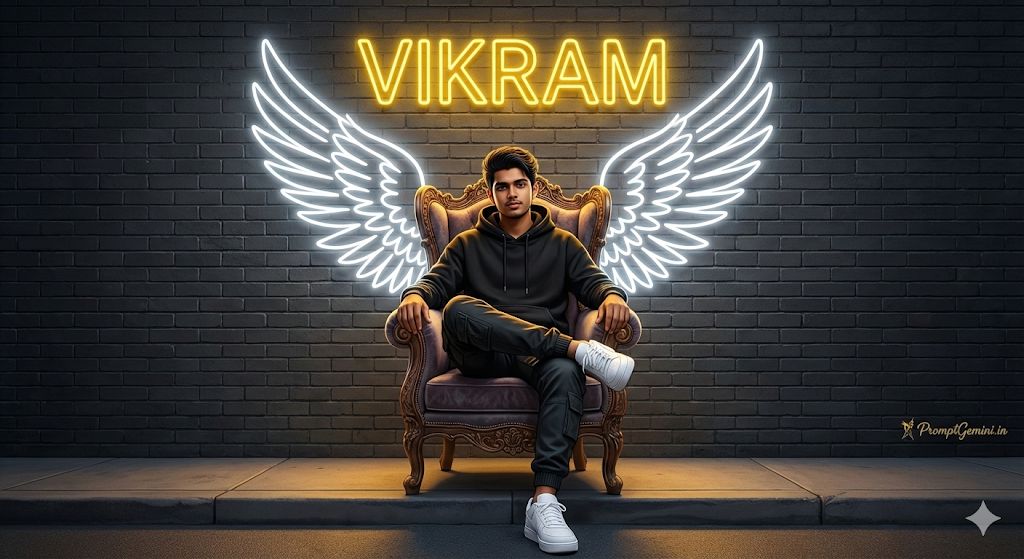
Below is the best prompt to create a “King Style” 3D name photo with angel wings.
Copy This Prompt
Prompt:
Create a 3D realistic illusion of a 20-year-old Indian boy sitting casually on a "King's Throne" chair. He is wearing a black hoodie, cargo pants, and white sneakers. He looks cool and confident.

Background: Behind him, there are large, glowing white neon angel wings on a dark grey wall.
Text: The name "VIKRAM" is written in bright yellow neon lights at the top of the wall.
Details: High quality, cinematic lighting, 4k resolution.
Signature: Text "PromptGemini.in" written in small artistic font in the bottom corner.
How to Change the Name?
It is very simple. In the prompt above, just remove the name “VIKRAM” and type your own name (example: “RAHUL” or “AMIT”). You can also change the hoodie color from “Black” to “Red” or “Blue”.
How to Use This Prompt?
- Copy the text from the box above.
- Open the Google Gemini App on your phone.
- Paste the prompt and change the name to your name.
- Click “Generate” and wait for 5 seconds.
- Download your cool 3D photo!
If you liked this prompt, share this website PromptGemini.in with your friends!