Contents
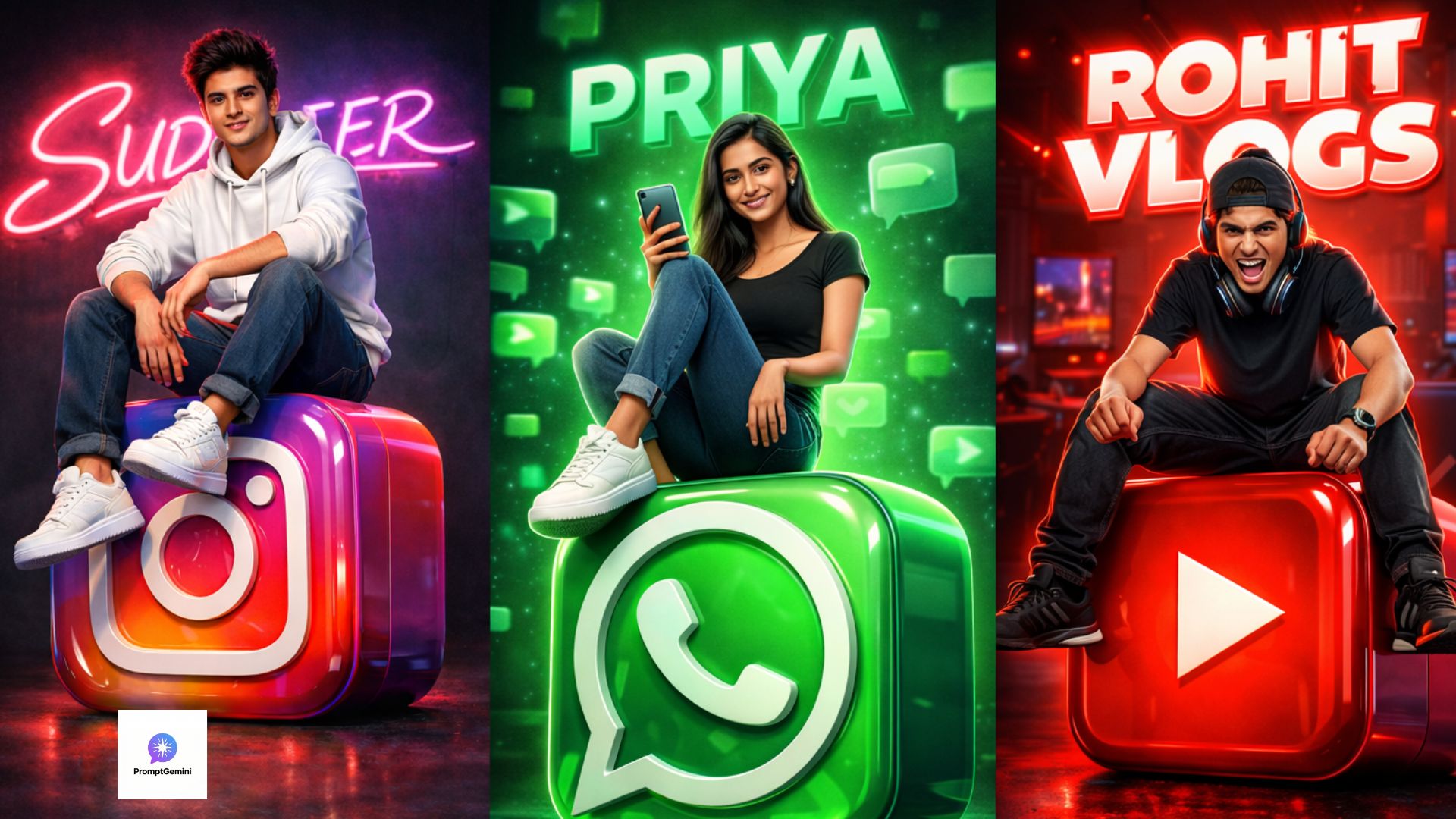
Welcome back to PromptGemini.in! If you have opened Instagram or Facebook recently, you have definitely seen those amazing 3D profile pictures where a boy or girl is sitting casually on top of a giant social media logo with their name written behind them in neon lights. If you are wondering how to make them, you are in the perfect place. Today, we are sharing the ultimate Viral 3D Social Media AI Prompts so you can create these masterpieces for yourself.
Creating these trendy images used to require high-level Photoshop skills, but now, thanks to Google Gemini and Bing Image Creator, anyone can do it for free. You do not need to be a graphic designer. All you need is the right text command. In this comprehensive guide, we will break down the best Viral 3D Social Media AI Prompts, explain how to customise them for any app, and show you how to get the highest 4K quality.
Why Are These Viral 3D Social Media AI Prompts So Popular? You might be wondering why millions of people in India and around the world are searching for these specific prompts. The answer is personalisation. A standard profile picture is boring, but a Viral 3D Social Media AI Prompt allows you to mix your personal identity (your name, your clothing style) with the platform you love. Whether you are a WhatsApp group admin, an Instagram influencer, or a YouTube gamer, these 3D images immediately grab attention and make your profile stand out from the crowd.
Let’s dive into the top 5 prompts. We have categorised them by platform so you can easily choose your favourite.
Option 1: The Instagram Influencer Style. Instagram is all about aesthetics, fashion, and vibrant colours. This prompt is designed to highlight the pink, purple, and orange gradient of the Instagram logo while making you look like a top-tier influencer.
📸 Instagram 3D Prompt
Why This Prompt Works: In this Viral 3D Social Media AI Prompt, we used keywords like “glossy 3D Instagram logo” and “casual streetwear.” This tells the AI to make the environment look modern and trendy. The glowing neon text in the background adds depth, making it look like a professional studio photoshoot.
Option 2: The WhatsApp Chat Master. WhatsApp is the most used messaging app in India. If you want a cool DP for your college or family WhatsApp group, this green-themed prompt is perfect for you.
💬 WhatsApp 3D Prompt
Why This Prompt Works: The colour green represents the WhatsApp brand. By adding details like “floating 3D chat bubbles” and a “green neon aura,” this Viral 3D Social Media AI Prompt creates a cohesive and visually pleasing image that perfectly matches the WhatsApp aesthetic.
Option 3: The YouTube Gamer / Creator. If you have a YouTube channel, you need a profile picture that looks energetic and professional. This red and black theme is aggressive, modern, and perfect for gamers or vloggers.
▶️ YouTube 3D Prompt
Why This Prompt Works: This Viral 3D Social Media AI Prompt uses terms like “gamer setup,” “headphones,” and “metallic red.” These specific words ensure that the AI generates an image that fits the YouTube culture, making it highly attractive to your subscribers.
Viral 3D Social Media AI Prompts:
How to Use These Viral 3D Social Media AI Prompts. If you are using Google Gemini for the first time, follow this simple step-by-step tutorial to get the best results:
- Select and Copy: Read through the options above and click the “Copy Prompt” button on your favourite style.
- Open Gemini AI: Open your browser and go to the Google Gemini website. Log in with your Gmail ID.
- Customise Your Name: Paste the text into the chatbox. This is the most important step: Find the dummy name in the text (like “SUDHEER” or “RAHUL”) and replace it with your own name in CAPITAL LETTERS.
- Edit the Outfit (Optional): If you don’t like white hoodies, change the text to “black leather jacket” or “traditional Indian Kurta.” The AI will follow your exact instructions.
- Generate: Press the Enter button. Gemini will generate four different high-quality 3D images in just a few seconds.
- Download and Apply: Click on the image you like the most, download it to your gallery, and set it as your new DP!
Troubleshooting:
Common AI Mistakes and How to Fix Them. Sometimes, Artificial Intelligence makes silly mistakes. Here are a few common issues you might face when using a Viral 3D Social Media AI Prompt and how to solve them:
- Spelling Mistakes in Your Name: AI struggles with spelling, especially with long Indian names. If your name is spelt wrong in the neon lights, do not panic. Simply click the “Generate More” button. Usually, it gets the spelling 100% correct on the second or third try.
- Deformed Faces or Hands: If the boy or girl in the image has weird eyes or six fingers, discard that image. Use keywords like “symmetrical face” and “perfect anatomy” to fix this in the next generation.
- The Logo Looks Fake: If the Instagram or YouTube logo looks distorted, add the word “Official Brand Logo” to your prompt to force the AI to draw it accurately.
Why Customisation is the Key to Viral Photos
Do not just copy and paste blindly! The true power of a Viral 3D Social Media AI Prompt is that you can change the environment. Are you a girl? Change “handsome boy” to “beautiful girl.” Do you love anime? Add the keyword “Anime style illustration” to the end of the prompt. Do you want to be sitting on a Snapchat ghost or a Telegram paper plane? Just change the name of the app in the text. The possibilities are truly endless.
Conclusion:
Upgrading your digital identity has never been easier. By using these Viral 3D Social Media AI Prompts, you can transform a boring profile into a 3D masterpiece that will definitely make your friends ask, “How did you make that?” We hope you found this guide helpful. If you successfully created your 3D avatar, share this article with your friends so they can make theirs too! Don’t forget to bookmark PromptGemini.in, as we post brand new, trending AI prompts every single day. Keep creating, keep experimenting, and enjoy your new viral DP!